Azure DevOps Consulting: Accelerating Digital Transformation with Confidence
In today’s competitive digital landscape, businesses face increasing pressure to deliver software faster, more securely, and with greater collaboration. Customers expect quick updates, zero downtime, and seamless digital experiences. From startups to large enterprises, the need for streamlined development and operations has never been higher.
This is where Azure DevOps Consulting comes in—helping organizations unlock the full power of Microsoft’s Azure DevOps platform while aligning technology with business goals. With expert guidance, companies can reduce delivery time, strengthen collaboration, and achieve operational excellence.
What is Azure DevOps?
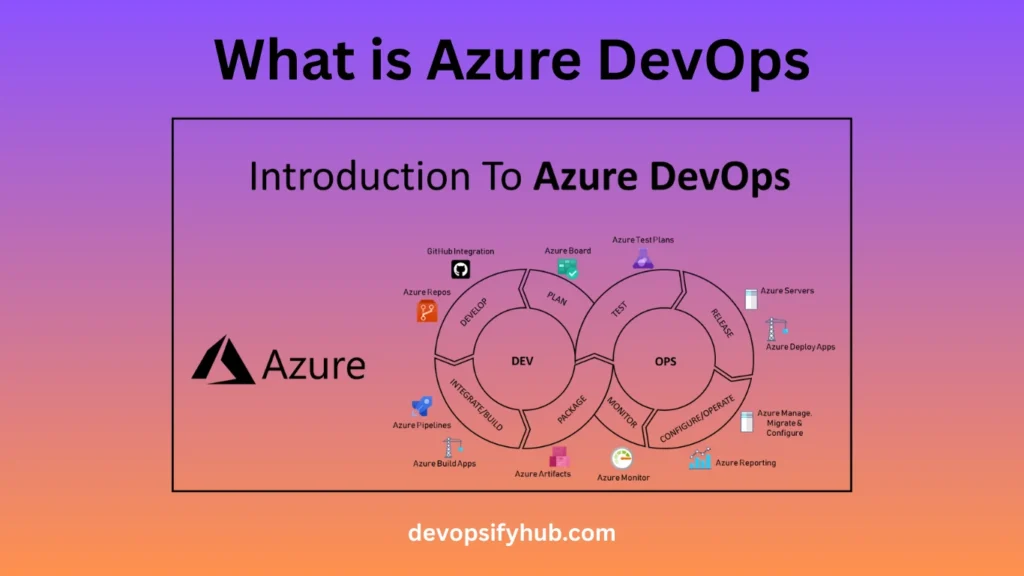
Azure DevOps is Microsoft’s integrated platform that covers the entire software development lifecycle (SDLC). Originally introduced as Visual Studio Team Services (VSTS), it has evolved into a robust toolset that enables planning, development, testing, deployment, and monitoring—all in one place.
The platform includes five key components:
- Azure Boards – Agile planning & project tracking with Kanban boards, dashboards, and reporting tools.
- Azure Pipelines – Continuous Integration/Continuous Delivery (CI/CD) pipelines for automated builds, tests, and deployments.
- Azure Repos – Version control with unlimited Git repositories, branching, and pull request features.
- Azure Test Plans – Manual and automated testing frameworks for quality assurance.
- Azure Artifacts – Secure package management for dependencies like NuGet, npm, Maven, and Python.
Together, these tools create a connected ecosystem that drives efficiency, visibility, and collaboration across teams. Unlike siloed systems, Azure DevOps provides a single pane of glass for managing the entire development lifecycle.
Why Do Companies Need Azure DevOps Consulting?
While Azure DevOps offers powerful features, implementing it effectively requires expertise. Many organizations purchase the tools but fail to see meaningful results due to poor configuration or lack of strategy. Common challenges include:
- Migrating from legacy tools like Jenkins, TFS, or manual processes.
- Aligning DevOps workflows with compliance and governance in industries like finance or healthcare.
Building scalable pipelines that work across hybrid or multi-cloud environments.
Upskilling teams who are new to DevOps practices.
This is where Azure DevOps Consulting Services add value. A consulting partner helps organizations:
- Design a tailored roadmap for DevOps adoption.
- Implement best practices for automation, CI/CD, and collaboration.
- Minimize disruption during migration.
Maximize return on investment (ROI) by avoiding costly mistakes.
Key Benefits of Azure DevOps Consulting
1. Faster Time-to-Market
Automated CI/CD pipelines eliminate manual bottlenecks, reducing release cycles from weeks to hours. Businesses can ship features faster without sacrificing quality.
Example: A retail company deploying weekly updates to its e-commerce platform can move to daily releases with Azure Pipelines, improving customer experience and competitiveness.
2. Improved Collaboration
Centralized boards, dashboards, and repositories break down silos between developers, testers, and operations teams. Everyone works on the same platform, with real-time visibility into progress.
Example: Agile teams spread across different countries can collaborate using Azure Boards and Repos, ensuring smooth communication without relying on multiple disconnected tools.
3. Enhanced Security & Governance
In industries like healthcare and finance, compliance is non-negotiable. Azure DevOps includes built-in features like role-based access, audit trails, and policy enforcement. Consultants customize these to meet HIPAA, GDPR, or ISO requirements.
4. Cost Efficiency
Consultants optimize pipelines and infrastructure to avoid waste. Predictable, usage-based pricing ensures businesses pay only for what they need.
Example: Instead of overprovisioning cloud servers, IaC (Infrastructure as Code) with Azure ensures resources are allocated automatically based on demand.
5. Scalability & Flexibility
Azure DevOps works seamlessly in public cloud, private cloud, or hybrid environments. It also integrates with third-party tools like Jenkins, Terraform, Ansible, Docker, and Kubernetes.
This flexibility makes it suitable for organizations at any stage of cloud adoption.
Core Features Explained
1. Azure Boards – Smarter Project Management
- Agile planning with customizable Kanban boards.
- Sprint tracking for Scrum teams.
- Reporting dashboards for real-time visibility.
Impact: Better project alignment and reduced miscommunication.
2. Azure Pipelines – CI/CD Made Simple
- Supports any platform or language.
- Cloud-hosted or self-hosted build agents.
- Integrates with GitHub, Jenkins, and Bitbucket.
Impact: Automated pipelines reduce human error and accelerate deployment.
3. Azure Repos – Enterprise-Grade Code Management
- Unlimited private Git repositories.
- Advanced code review and branching strategies.
- Pull request validation for higher-quality code.
Impact: Developers collaborate more effectively, improving code quality.
4. Azure Test Plans – Quality at Scale
- Manual, exploratory, and automated testing.
- End-to-end traceability with test case management.
Impact: Organizations catch bugs earlier, saving time and costs.
5. Azure Artifacts – Secure Dependency Management
- Host and share packages like npm, NuGet, and Maven.
- Integrates directly into CI/CD pipelines.
Impact: Secure and consistent package delivery across teams.
Industry Use Cases
- Finance – Secure, compliant CI/CD pipelines for mobile banking apps.
- Healthcare – HIPAA-compliant workflows for patient data systems.
- Retail & E-commerce – Scaling pipelines to handle seasonal demand spikes.
- Startups – Cost-efficient automation to compete with established players.
Azure DevOps vs. Alternatives
| Feature | Azure DevOps | GitHub Actions | Jenkins | GitLab |
| Lifecycle Coverage | Full (Plan → Deploy) | Limited | CI/CD only | CI/CD + Repos |
| Integration | Strong (MS + 3rd-party) | Best with GitHub | Plugin-based | Strong |
| Governance | Enterprise-grade | Basic | Depends on setup | Good |
| Pricing | Predictable SaaS | Free for OSS | Free but resource heavy | Subscription-based |
Conclusion: Azure DevOps stands out for end-to-end lifecycle management and enterprise governance, making it ideal for regulated industries and large-scale organizations.
The Role of Consulting in Azure DevOps Success
A consulting partner ensures:
- Smooth migration from legacy tools.
- Customized pipeline design for your environment.
- Automation strategies aligned with business goals.
- Training & support for long-term adoption.
- Continuous monitoring and cost optimization.
Without consulting, companies often face failed DevOps adoptions, where tools are implemented but cultural and process changes are missing.
Step-by-Step Implementation Roadmap
- Assessment – Review current workflows, tools, and challenges.
- Strategy & Roadmap – Define KPIs, compliance needs, and success metrics.
- Tool Integration – Configure Azure Boards, Repos, Pipelines, Test Plans, and Artifacts.
- Automation – Implement CI/CD and Infrastructure as Code.
- Training – Conduct workshops to upskill teams.
- Monitoring & Optimization – Track performance and continuously improve.
FAQs
Q1: Is Azure DevOps free to use?
Yes. Small teams can use the free tier, while enterprises can choose scalable paid plans.
Q2: How is Azure DevOps different from GitHub?
Azure DevOps is full lifecycle (planning, CI/CD, testing, governance), while GitHub focuses mainly on code hosting and collaboration.
Q3: Do I need consulting if I already use DevOps tools?
Yes. Consulting ensures optimized workflows, governance, and maximum ROI.
Q4: Can Azure DevOps integrate with non-Microsoft tools?
Absolutely. It supports Jenkins, Kubernetes, Ansible, Terraform, and more.
Conclusion
Adopting Azure DevOps can transform how organizations build, test, and deploy software. But success requires more than just tools—it demands the right strategy, governance, and cultural alignment.
With Azure DevOps Consulting, businesses gain a trusted partner to accelerate innovation, reduce risks, and achieve measurable results. Whether you’re a startup aiming to scale or an enterprise modernizing legacy systems, Azure DevOps consulting provides the roadmap to digital transformation.